Table of Contents
Part I — Overview & Architecture
- 1Executive Overview3
- 2System Architecture5
- 3Repository Structure7
- 4Backend Architecture8
- 5Frontend Architecture10
Part II — Using PLOCAL
- 6Public Website Navigation11
- 7Nationwide Directory & Find Businesses13
- 8Business Profiles & Contextual Navigation15
- 9Business Submission17
Part III — Payments, Evaluation & Recognition
- 10Payments & Stripe19
- 11Paid Activation22
- 12Evaluation — Digital / Service / Trust23
- 13Public Voting24
- 14Recognition25
Part IV — Portals & Administration
- 15Business Portal27
- 16Internal Portal & RBAC29
- 17Internal Evaluation Workflow31
- 18Payment Operations32
- 19Support Cases33
- 20Blog CMS34
- 21Advertiser Management35
Part V — Technical Foundations
- 22Database Architecture36
- 23Authentication & Security Model38
- 24File Storage39
- 25Email40
- 26Queues & Background Jobs41
Part VI — Production Deployment
- 27Production Environment Reference42
- 28Production Deployment44
- 29Production Commands Reference45
- 30Commands Never to Run in Production46
- 31Database Bootstrap47
- 32Stripe Production Setup48
- 33Google Workspace SMTP Setup49
- 34Web Server Configuration50
- 35DNS & HTTPS51
- 36Backups52
Part VII — Operations & Maintenance
- 37Logs & Troubleshooting53
- 38Maintenance56
- 39Testing57
- 40Local Development Environment58
Part VIII — Quick Reference & Appendices
- 41Owner Quick Start59
- 42Administrator Daily Workflow60
- 43Production Launch Checklist61
- 44Post-Launch Checklist62
- 45Recommended Follow-Up Improvements63
- 46Glossary64
- 47Quick Route Reference66
- 48Owner Production Responsibilities67
- 49Final System Status68
Part I — Overview & Architecture
1.Executive Overview
PLOCAL is a nationwide local business evaluation platform. It is built around one core
model, repeated across every U.S. state, city, and category:
DIRECTORY
+
EVALUATION
+
RECOGNITION
PLOCAL helps customers find local businesses they can trust, and helps
business owners understand how professional, credible, visible, and
customer-ready their business appears online. Unlike a simple listing directory, PLOCAL does
not just confirm that a business exists — it evaluates it against a structured, transparent
standard, then presents the outcome publicly.
Who PLOCAL Serves
Customers
People searching for a trustworthy local provider — contractors, salons, restaurants,
and other local service businesses — across any U.S. state or city.
Business Owners
Businesses that want a professional evaluation of their online presence, and the
opportunity to be publicly recognized for strong performance.
Main System Areas
Public Directory
Nationwide search and browsing of evaluated businesses.
Business Evaluation
Structured Digital / Service / Trust assessment for every activated Business.
Public Voting
Community input that feeds qualification, not the final decision.
Recognition
Business of the Day, Month, and Year, awarded on evaluated merit.
Business Portal
Invitation-only account for an activated Business to view its own status.
Internal Administration
Staff workspace for reviewing submissions, evaluations, payments, and content.
Blog
Editorial content managed internally, published publicly.
Advertisers
A manually curated homepage sponsor carousel, unrelated to Evaluation or Recognition.
High-Level Flow
Visitor / Business
↓
PLOCAL
↓
Directory
Evaluation
Recognition
Core Trust Principle
A Business pays PLOCAL for the Evaluation service. Payment never purchases ranking, score,
votes, a badge, an Award, a recommendation, or placement. This principle governs every
commercial and editorial decision described in this guide.
Part I — Overview & Architecture
2.System Architecture
PLOCAL is a single Laravel application. It is primarily server-rendered: pages are built on
the server using Blade templates and returned as complete HTML, rather than relying on a
separate single-page-application frontend framework. This keeps the system simple to operate,
deploy, and reason about.
Browser
↓
Laravel Routes
↓
Controllers
↓
Application Services
↓
Domain Rules
↓
Database
Stripe
Mail
Storage
Layer Responsibilities
| Layer | Responsibility |
|---|
| Frontend | Server-rendered Blade templates, page-specific CSS/JS, and standard HTML forms. No separate frontend build is required to serve the site. |
| Routes / Controllers | Accept an HTTP request, validate input, and hand off to the correct Application Service. Controllers stay thin. |
| Application Services | Coordinate one specific use case end-to-end (for example, activating a Business after payment, or casting a public vote). |
| Domain Rules | The business rules that must always hold true regardless of caller — for example, how the PLOCAL Score is calculated, or what counts as a valid U.S. state code. |
| Database | MySQL. The single source of truth for every Business, Submission, Payment, Evaluation, Vote, and Award. |
| Stripe | Handles the Evaluation Checkout payment and is the sole authority on whether a payment succeeded. |
| Mail | Sends invitation, notification, and transactional email through SMTP. |
| Storage | Holds private submission evidence and public content media (Blog images, advertiser logos). |
Part I — Overview & Architecture
3.Repository Structure
The Laravel application lives entirely inside the backend/ directory of the
repository. The directories below are the ones an owner or developer will interact with most.
| Path | Purpose |
|---|
backend/app/Http/Controllers | Route entry points, grouped by Public, Business, and Internal. |
backend/app/Application | One class per real use case (submitting a business, casting a vote, issuing an invitation). |
backend/app/Domain | Pure business rules with no framework or database dependency (score calculation, state validation). |
backend/app/Infrastructure | Read-model implementations and integration-facing code. |
backend/app/Console/Commands | Artisan commands — production bootstrap, verification, and local developer tooling. |
backend/resources/views | All Blade templates: public/, business/, internal/, and shared layouts/ and partials/. |
backend/routes/web.php | Every public, Business, and Internal route. |
backend/database/migrations | The complete database schema history. |
backend/database/seeders | Reference-data seeders, including the one production-safe bootstrap seeder. |
backend/public | The web server document root — the only directory that should be exposed directly to the internet. |
backend/storage | Private submission evidence, logs, and framework cache — never web-exposed directly. |
backend/tests | The automated test suite covering the majority of product behavior. |
assets/ (repository root) | Shared CSS, JavaScript, images, and icon assets used by the public site. |
Note
This guide intentionally does not list every file — only the directories relevant to
understanding, operating, or maintaining PLOCAL.
Part I — Overview & Architecture
4.Backend Architecture
Every request follows the same predictable path through the backend:
HTTP Request
→
Route
→
Controller
→
Validation
→
Application Service
→
Domain Rules
→
Persistence
→
Response
Routing
Routes are grouped into three clearly separated areas:
- Public routes — no authentication, open to any visitor.
- Business routes — prefixed
/business, require a Business Portal login.
- Internal routes — prefixed
/internal, require staff login and role permission.
Validation & Authorization
Every state-changing request is validated before any Application Service runs. Internal
routes are additionally protected by role-based permission checks (see Chapter 16 and Chapter
23), so a Reviewer account, for example, cannot perform an Administrator-only action even if it
knows the correct URL.
Background Jobs
Notification delivery (invitation emails, activation confirmations, support-case
acknowledgements) is queued rather than sent inline, so a slow mail provider never blocks a
visitor-facing request. See Chapter 26 for the current queue configuration.
External Integrations
| Integration | Purpose |
|---|
| Stripe | Evaluation Checkout payment and signed webhook confirmation. |
| SMTP (Google Workspace) | Transactional email delivery from info@plocal.com. |
| MySQL | Primary data store for every domain object in the system. |
Part I — Overview & Architecture
5.Frontend Architecture
PLOCAL's frontend is server-rendered. Laravel's Blade templating engine builds each page on
the server and returns finished HTML — there is no separate JavaScript framework driving page
navigation, and no client-side routing to keep in sync with the backend.
Template Organization
| Area | Location |
|---|
| Shared layout & navigation | resources/views/layouts, resources/views/public/partials |
| Public pages | resources/views/public |
| Business Portal pages | resources/views/business |
| Internal Portal pages | resources/views/internal |
The public site's header and footer are each a single shared partial included on every
public page, so a navigation change made once is reflected everywhere automatically.
Assets
CSS and JavaScript are organized by page and by shared concern under the repository's
assets/ directory (bootstrap and vendor libraries, a shared custom stylesheet, and
page-specific stylesheets/scripts). Pages are responsive down to common mobile widths.
Forms & Server Communication
Public forms (Submit Your Business, Contact, Support) post directly to a Laravel route.
Where a form submits without a full page reload, it uses a plain JavaScript fetch
request against the same route and displays the JSON result inline — there is no separate API
layer or token-based authentication for these public forms.
Part II — Using PLOCAL
6.Public Website Navigation
The table below covers the primary pages a visitor encounters. Internal action-only
endpoints are intentionally omitted — see Chapter 47 for a short reference of the most useful
routes.
| Route | Purpose |
|---|
| / | Home — Business of the Day, featured Recognition, and entry points into the Directory. |
| /about.html | About PLOCAL — what the platform is and why it exists. |
| /contact.html | General contact form. |
| /faq.html | Frequently asked questions. |
| /support.html | Support request form (account, Profile, Evaluation, billing, accessibility, Trust & Safety). |
| /trust-and-safety.html | Trust & Safety overview. |
| /protect-yourself-from-fraud.html | Fraud-awareness guide for customers. |
| /terms-and-conditions.html | Terms & Conditions. |
| /accessibility-statement.html | Accessibility statement. |
| /how-plocal-evaluation-works.html | Public explanation of the Evaluation model. |
| /submit-your-business | Business Submission form (see Chapter 9). |
| /find-businesses | Nationwide directory search (see Chapter 7). |
| /categories.html | Curated category landing page. |
| /usa | National directory hub, branching into state and city hubs. |
| /{state}, /{state}/{city}, /{state}/{city}/{service} | Geography-based discovery hierarchy. |
| /recognition | Business of the Day, Month, and Year (see Chapter 14). |
| /blog, /blog/{slug} | Published editorial articles. |
| /pro/{businessSlug} | An individual Business Profile (see Chapter 8). |
Two Directory Layers
/find-businesses is the current, primary nationwide search surface. The
geography hierarchy under /usa is a complementary, SEO-oriented browsing path
into the same underlying evaluated Businesses — both ultimately lead to the same Business
Profile pages.
Part II — Using PLOCAL
7.Nationwide Directory & Find Businesses
PLOCAL supports all 50 U.S. states using canonical two-letter USPS state codes (for example,
CA, TX, NY). A Submission is only accepted with a valid
code from this canonical list — full state names or invalid codes are rejected at submission
time. Cities are created automatically the first time a legitimately paid, activated Business
reports that city — there is no need to pre-populate every city in the country in advance.
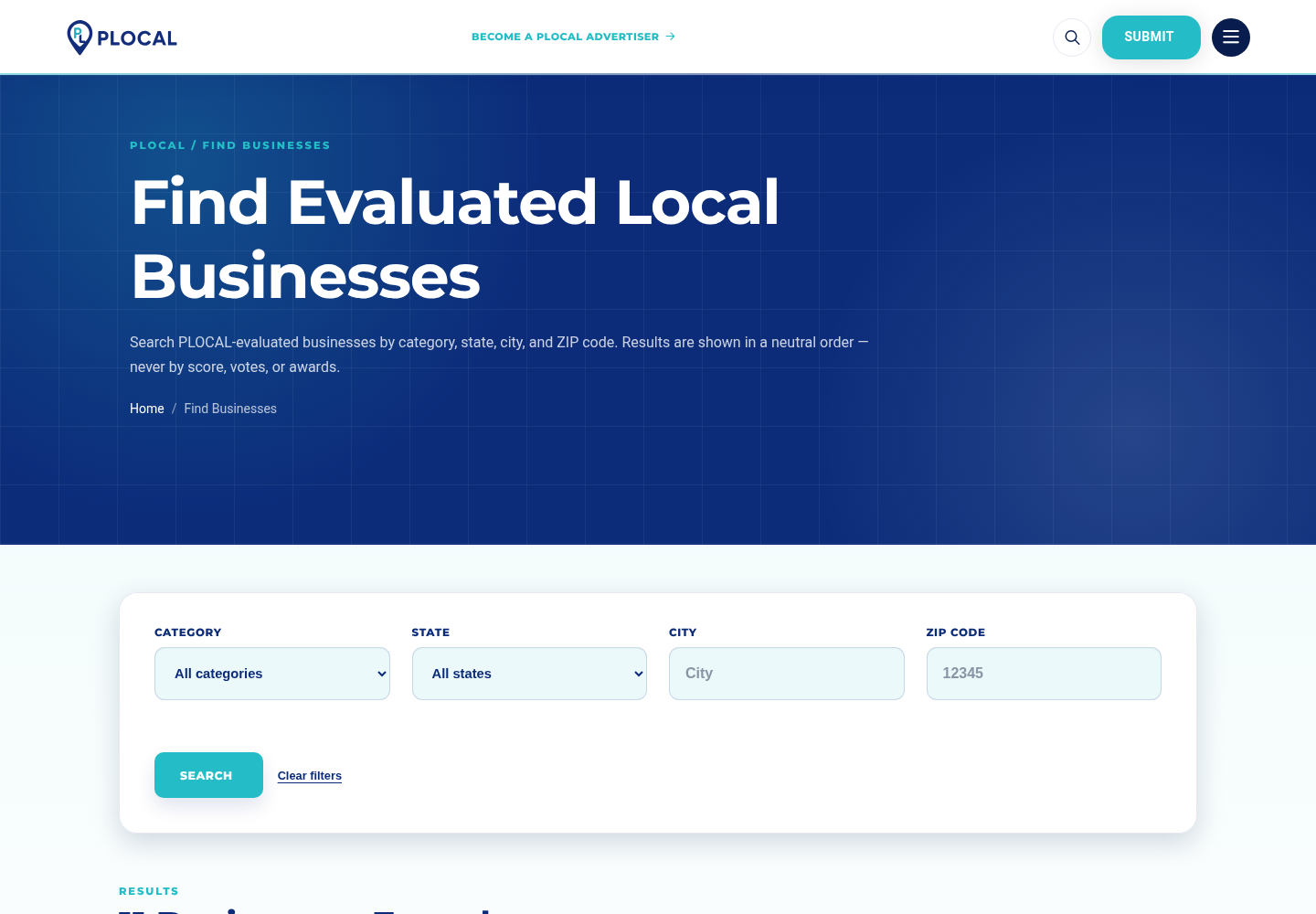
Find Businesses — nationwide search by category, state, city, and ZIP. Captured from the local development environment.
Search Filters
- Category — Construction & Home Services, Beauty & Personal Care, Restaurants & Food Businesses.
- State — any of the 50 canonical U.S. states.
- City — free-text, matched against provisioned locations.
- ZIP — five-digit ZIP code.
Result Ordering
Results are shown in a neutral order. Placement is not determined by
payment, votes, Awards, or Evaluation score — every eligible Business receives equal
presentation weight in the result list.
Visitor Journey
- Open Find Businesses.
- Select any combination of Category, State, City, or ZIP.
- Review the neutral-order result list.
- Open a Business Profile for full detail.
- Return to the exact same search results using the page's Previous/Next or Back-to-Results controls (see Chapter 8).
Publication Safety
Only a Business that is active, published, and discovery-eligible can appear in search
results — a suspended, unpublished, or ineligible Business is never shown publicly, regardless
of filters applied.
Part II — Using PLOCAL
8.Business Profiles & Contextual Navigation
Every evaluated Business has a public profile at /pro/{businessSlug}.
A live Business Profile, showing category, location, website screenshot, and Digital / Service / Trust result. Captured from the local development environment.
Profile Contents
- Business identity — name, category, city and state.
- Website and submitted website screenshot.
- Evaluation result, shown in the current Digital / Service / Trust format once finalized.
- Current Recognition status, if the Business currently holds or has held an Award.
- Public Voting, where the Evaluation Window is still open for voting.
- Contextual Previous/Next navigation (below).
Contextual Previous/Next Navigation
Profile pages remember how the visitor arrived, so browsing forward and backward stays
inside the same context instead of jumping to an unrelated Business:
| Arrived From | Previous / Next Behavior |
|---|
| Newest Nominees | Chronological Nominee-to-Nominee navigation. |
| Recognition | Chronological navigation within the same Day, Month, or Year level. |
| Find Businesses | Navigation within the exact search-result context (same filters and page). |
| Direct Profile visit (no context) | Falls back to Find Businesses rather than fabricating an arbitrary neighbor. |
Part II — Using PLOCAL
9.Business Submission
Submit Your Business — the public Submission form. Captured from the local development environment.
Information Collected
- Business name, category, city, state, and ZIP.
- Website URL, main services, and a business description.
- Contact details for the submitter.
- A website screenshot, used as evaluation evidence.
Website Screenshot Requirement
| Requirement | Value |
|---|
| Format | JPEG |
| Exact dimensions | 1068 × 646 pixels |
| Maximum file size | 150 KB |
Verified directly against the current Submission validation rules.
What Happens After Submission
A successful Submission creates a durable record and immediately proceeds to Evaluation
Checkout (Chapter 10). The Submission itself does not create a public Business Profile —
publication only happens after payment is confirmed and the Business is activated (Chapter 11).
No Pre-Payment Approval Step
The current flow does not include a "wait for approval before payment" stage, and there is no
legacy Claim/Accept step exposed on the public Submission flow. Checkout follows immediately
after a valid Submission.
Part III — Payments, Evaluation & Recognition
10.Payments & Stripe
PLOCAL charges a fixed Evaluation service fee of $250 USD plus applicable taxes,
collected through Stripe's hosted Checkout page.
Submission
→
Checkout Creation
→
Stripe Hosted Page
→
Card Payment
→
Signed Stripe Webhook
→
PLOCAL Reconciliation
→
Paid Activation
Payment Authority
The browser's post-checkout success page is never treated as proof of
payment. Only Stripe's signed server-to-server webhook event confirms that a
payment succeeded and authorizes activation. This prevents a visitor from spoofing a
successful payment by manipulating the browser.
What Payment Does and Does Not Buy
Payment purchases
- The Evaluation service itself.
Payment never purchases
- Ranking or placement
- Evaluation score
- Votes
- A badge
- An Award or Recognition
- A recommendation
Other Payment Behavior
- Automatic tax — applicable tax is calculated and added on top of the base fee where configured.
- Duplicate charges / refunds — handled through Internal Payment Operations (Chapter 18), never through direct database edits.
- Activation retry — if activation did not complete automatically after a confirmed payment, an Administrator can retry it from Internal Payment Operations.
Stripe: Test vs. Production
| Environment | Description |
|---|
| Development / Sandbox | Uses Stripe test-mode keys. No real card is charged. |
| Production / LIVE | Uses Stripe live-mode keys. Real cards are charged real money. |
STRIPE_SECRET_KEY=
STRIPE_WEBHOOK_SECRET=
Local Development
php artisan serve
stripe listen --forward-to http://localhost:8000/webhooks/stripe
Stripe CLI Is Local-Only
The stripe listen command is a local development convenience. Production never
uses the Stripe CLI listener — it receives webhook events directly from Stripe over HTTPS at
the production domain (see Chapter 32).
Part III — Payments, Evaluation & Recognition
11.Paid Activation
Once Stripe's signed webhook confirms payment, PLOCAL provisions everything the Business
needs in a single, idempotent sequence:
Business
→
Business Profile
→
Nominee
→
Evaluation Window
→
Location / Discovery Reconciliation
→
Business Portal Invitation
Idempotency: replaying the same confirmed payment event does not create a
duplicate Business or a duplicate Evaluation Window — activation is safe to retry.
If activation did not fully complete (for example, a transient failure between steps), an
Administrator can trigger a safe retry from Internal Payment Operations rather than needing any
direct database intervention (Chapter 18).
Part III — Payments, Evaluation & Recognition
12.Evaluation — Digital / Service / Trust
Every activated Business is assessed across three dimensions, each scored from
0 to 10:
PLOCAL Score
Formula
PLOCAL Score = (Digital + Service + Trust) ÷ 3, rounded exactly once to two decimal places.
Evaluation Window
Each Evaluation runs on a fixed window of 96 elapsed hours from the moment
the Business is activated. This is wall-clock elapsed time, not 96 business hours.
Roles Involved
| Role | Responsibility |
|---|
| Evaluator | Performs the initial Digital / Service / Trust assessment for an assigned Nominee. |
| Reviewer | Reviews and can return an Evaluator's work for changes, or complete it. |
| Administrator | Holds full access, including the authority to make the Final Decision on Recognition. |
Legacy Note
An earlier, retired 100-point "ProScore" evaluation format exists only in historical/demo
data and is not the current Evaluation model. The current, active model is Digital / Service
/ Trust as described above.
Part III — Payments, Evaluation & Recognition
13.Public Voting
While a Nominee's Evaluation Window is open, the public can cast a Vote across the same
three dimensions: Digital, Service, and Trust.
Voting Rules
- One pseudonymous device identity may cast one Ballot per Nominee, per Evaluation Window.
- Each dimension requires a target of 5 valid, distinct-device votes to reach qualification.
- A staff Administrator can invalidate a Ballot found to be invalid, which recomputes qualification.
Public Ballot Cast
↓
Qualification Count per Dimension
↓
Candidate Eligibility
↓
Administrator Final Decision
Votes Inform — They Do Not Decide
Votes help establish qualification and public engagement signal. They do not directly select
a winner. PLOCAL, through the Administrator Final Decision, retains final Recognition
authority.
Part III — Payments, Evaluation & Recognition
14.Recognition
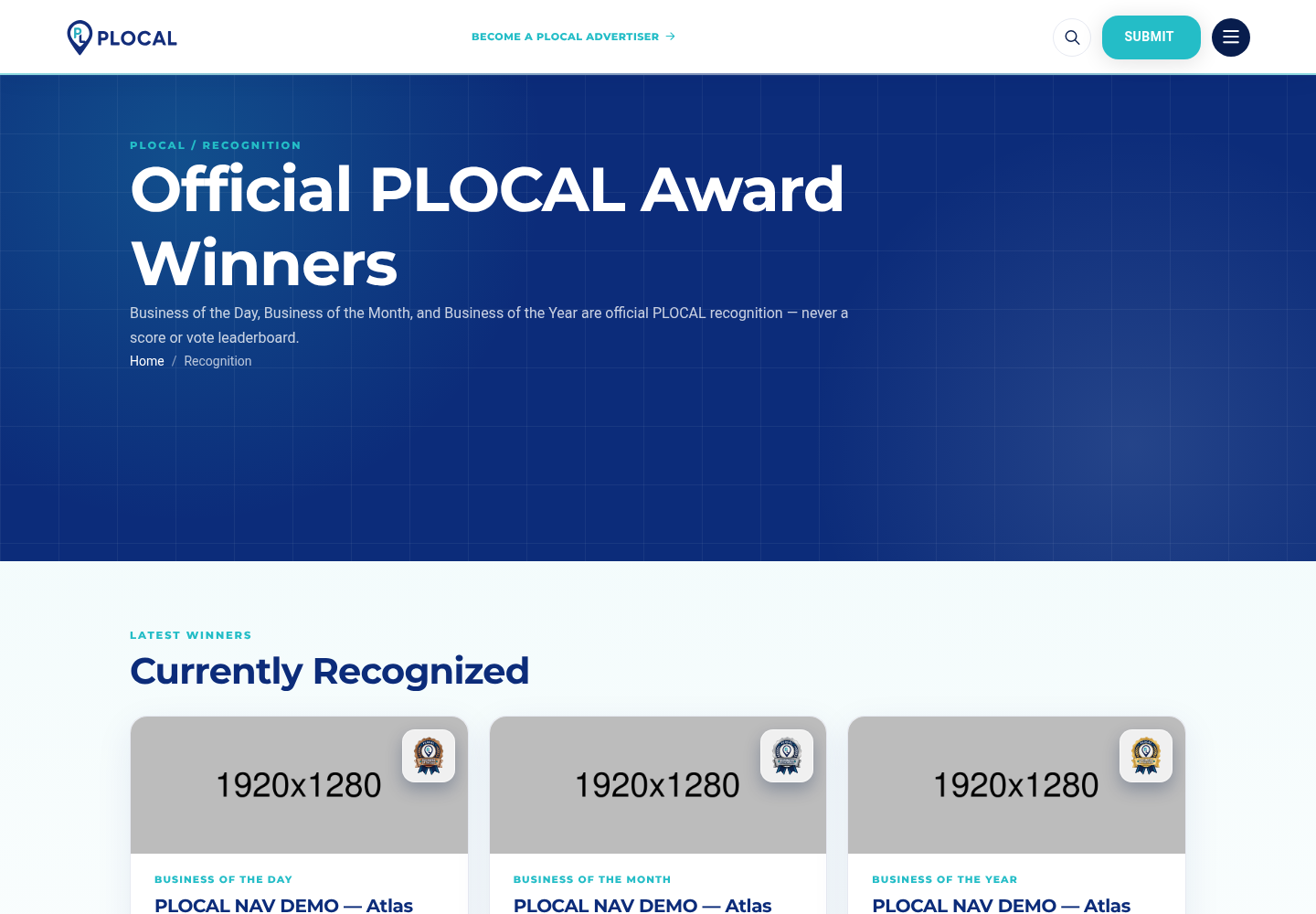
Recognition — Business of the Day, Month, and Year. Captured from the local development environment.
Recognition Hierarchy
Business of the Year
›
Business of the Month
›
Business of the Day
Lifecycle
A qualifying Nominee that reaches the Evaluation and voting thresholds becomes a
Candidate. An Administrator's Final Decision determines the
outcome — confirmed as a Nominee, granted Honors, awarded Business of the Day, or declined.
Honors and Day/Month/Year Awards are drawn from qualifying Candidates on a chronological basis.
Historical Record
Past Recognition remains publicly viewable. If an Award is later revoked or replaced, that
history is preserved for transparency rather than silently deleted — a revoked or inactive
Award is not shown as currently valid, but the record of it having occurred is retained
internally.
Part IV — Portals & Administration
15.Business Portal
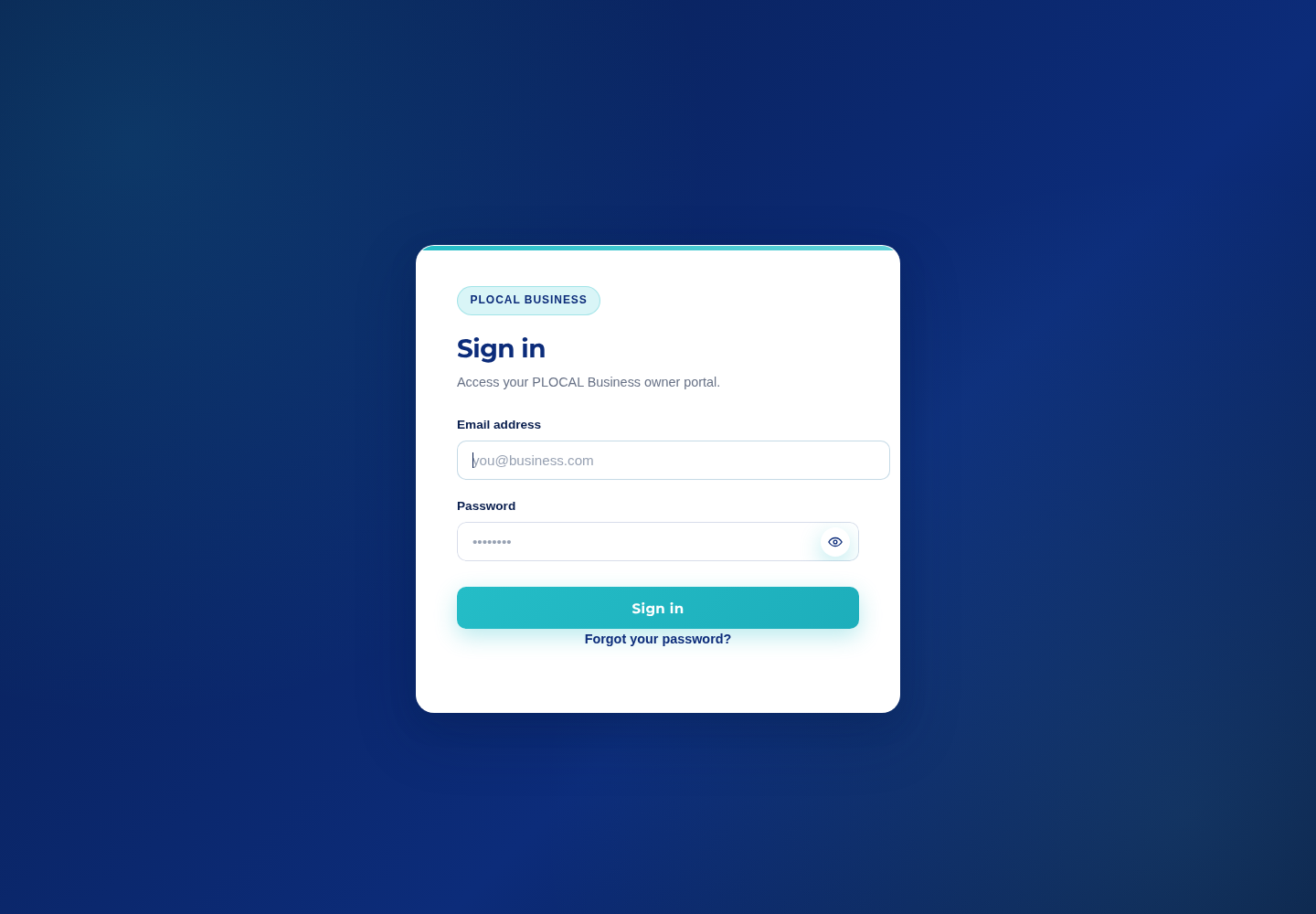
Business Portal sign-in at /business/login. Captured from the local development environment.
No Public Sign-Up
There is no public Business registration page. A Business account only comes into existence
through the invitation flow below.
Onboarding Flow
Paid Activation
→
Secure Email Invitation
→
Password Setup
→
/business/login
What a Business Account Can See
The dashboard is a read-only status view scoped strictly to the account's own Business:
- Business identity, category, city/state, and public Profile status and link.
- Evaluation status, and once finalized, its Digital / Service / Trust and PLOCAL Score result.
- Payment history, payment status, and refund status.
- Award and Recognition history for its own Business.
A Business account cannot view or influence another Business's data, and cannot access the
Internal Portal under any circumstance — the two systems use entirely separate authentication
guards.
Part IV — Portals & Administration
16.Internal Portal & RBAC
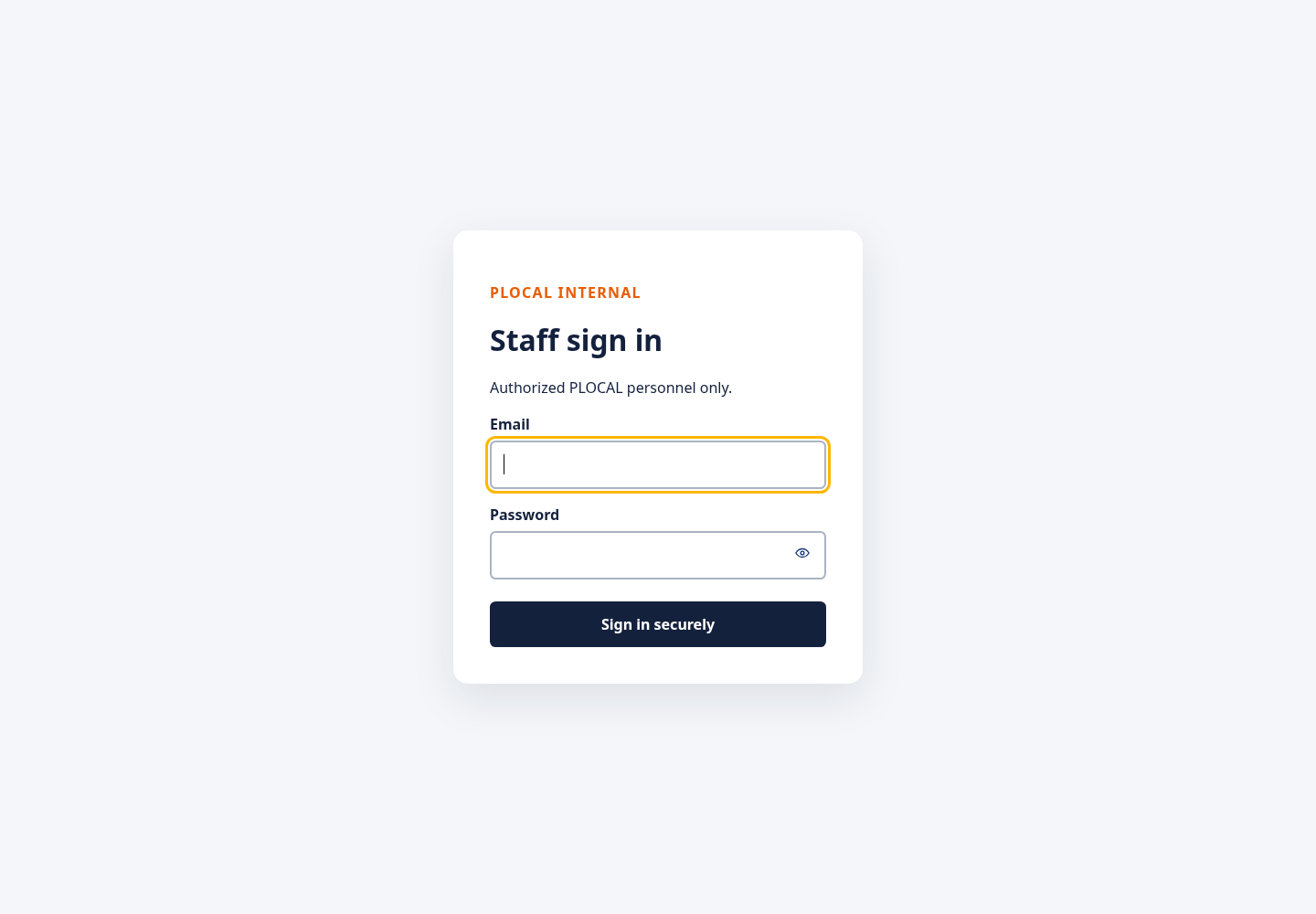
Internal Portal staff sign-in at /internal/login. Captured from the local development environment.
Roles
| Role | Access Level |
|---|
| Administrator | Full access, including Final Decisions, Payment Operations, Users, and content management. |
| Reviewer | Reviews assigned Evaluations, can return work for changes, confirms license/verification items. |
| Evaluator | Performs and submits assigned Evaluation scoring. |
Dashboard Areas
- Overview / Nominees & Evaluations
- Business Submissions
- Payment Operations
- Support Cases
- Business Duplicates
- Business of the Month / Business of the Year
- Award Corrections
- Blog
- Advertisers
- Internal Users Administrator-only
Every area is gated by role permission — a Reviewer or Evaluator account attempting an
Administrator-only action (such as managing Internal Users) is denied regardless of the URL
used.
Part IV — Portals & Administration
17.Internal Evaluation Workflow
- Staff logs in to the Internal Portal.
- Opens Nominees / Evaluations.
- Opens the assigned, current Nominee.
- Reviews the Business and submitted evidence (website, screenshot).
- Scores the Digital dimension.
- Scores the Service dimension.
- Scores the Trust dimension.
- Saves and submits the Evaluation for review.
- Candidate eligibility is evaluated once qualification thresholds are met.
- An Administrator makes the Final Decision.
- The Recognition outcome, if any, appears publicly on the Business Profile and Recognition page.
Verify Before Documenting UI Labels
Exact on-screen button labels may be refined over time. This workflow describes the current
functional sequence rather than pixel-exact wording.
Part IV — Portals & Administration
18.Payment Operations
Internal Payment Operations gives Administrators visibility and safe recovery tools over
every payment:
- Authoritative payment status and history per Business.
- Refund status, including duplicate-charge handling.
- Activation recovery/retry for a payment that was confirmed but did not fully activate.
- Relevant Stripe identifiers, where displayed for reference.
No Manual Override Authority
There is no "mark as paid" control that bypasses Stripe. Payment status must always remain
tied to Stripe's verified, signed state — Internal Payment Operations can retry activation for
an already-confirmed payment, but it cannot fabricate a payment.
Part IV — Portals & Administration
19.Support Cases
Current official contact channels:
| Channel | Value |
|---|
| Email | info@plocal.com |
| Phone | 888-988-3213 |
Public Contact and Support forms submit into the same internal Support Case system.
Every submission is durably recorded and reviewable by Administrators from Internal Support
Cases, with a status workflow (for example, received → in review → resolved).
The Business Profile's "Report a concern" link routes a visitor to the
official Contact page, which submits into this same Support Case system — there is a single,
consistent path for any public concern or fraud report, rather than a separate parallel system.
Part IV — Portals & Administration
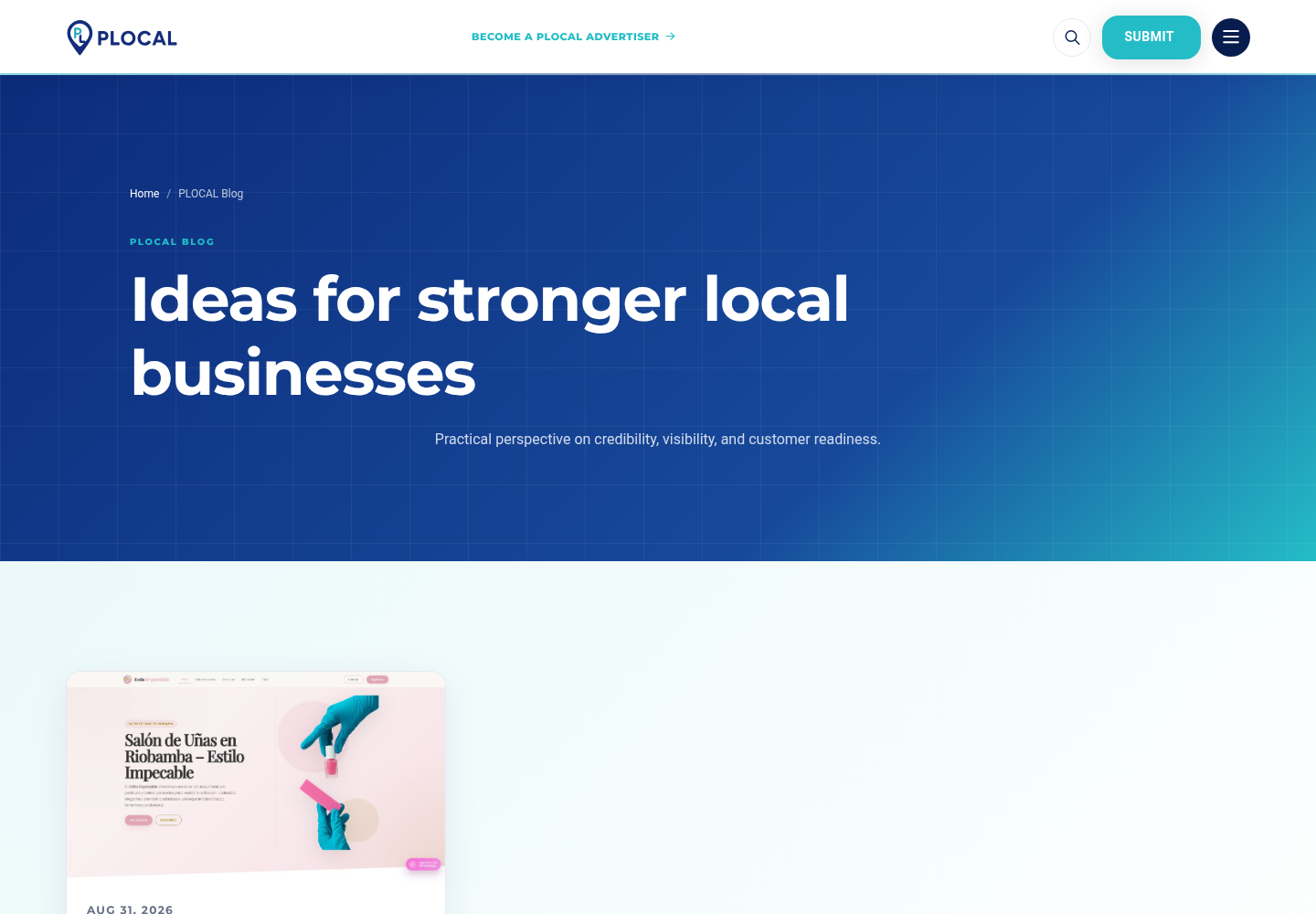
20.Blog CMS
Public Blog index at /blog. Captured from the local development environment.
Internal Management Capabilities
- Create and edit a draft article, including featured image and alt text.
- Publish and unpublish an article.
- Feature an article for prominent homepage/blog placement.
- Delete (archive) an article.
Public Visibility
Only published articles are ever publicly reachable at /blog or
/blog/{slug}. A draft or unpublished article is never exposed on the public site.
Part IV — Portals & Administration
21.Advertiser Management
Commercial Model
Advertisers are recruited and contacted outside PLOCAL. There is currently no
online advertiser self-service or payment system inside the platform — an Administrator
manually adds each approved advertiser.
What an Administrator Configures
- Company name and logo
- Website URL
- Active / inactive status
- Display order
- Optional visibility start/end dates
Active advertisers appear in the homepage sponsor carousel, linking only to their own
website_url.
Strict Separation
Advertising never affects ranking, Evaluation, Voting, or Recognition. An advertiser's logo on
the homepage carries no evaluative meaning whatsoever.
Part V — Technical Foundations
22.Database Architecture
PLOCAL uses MySQL as its single source of truth. The conceptual relationships below matter
more for day-to-day operation than the full column-level schema.
Business Submission
→
Evaluation Payment
→
Business
→
Business Profile
→
Nominee
→
Evaluation Window
Nominee → Voting Ballots
Evaluation → Final Decision / Recognition
Business → Awards
Other Core Tables
| Area | Holds |
|---|
| Internal Users | Staff accounts and their assigned roles/permissions. |
| States / Locations | The 50-state reference set and dynamically provisioned cities. |
| Categories | The current product category taxonomy. |
| Blog Articles | Editorial content and publication status. |
| Advertisers | The homepage sponsor carousel entries. |
Migrations under backend/database/migrations are the authoritative schema
history; they should be applied in order and never edited after being run against a live
database.
Part V — Technical Foundations
23.Authentication & Security Model
Three Separate Authentication Systems
| System | Who | Notes |
|---|
| Public | Any visitor | No authentication required for browsing pages. |
| Business | An activated Business's authorized user | /business/login, invitation-based onboarding only. |
| Internal | PLOCAL staff | /internal/login, role-based access control. |
Keeping Business and Internal authentication completely separate ensures a compromised or
misused Business account can never reach staff-only tooling, and vice versa.
Current Security Controls
- CSRF protection on session-based forms, with a documented, narrow exception for
unauthenticated public endpoints (Submission, Support, payment webhooks) that are instead
protected by same-origin checks and per-route rate limiting.
- Signed URLs for the payment checkout flow.
- Stripe webhook signature verification as the sole payment authority.
- Role-based authorization (RBAC) throughout the Internal Portal.
- Rate limiting on Submission, Voting, Support Case, and payment-checkout endpoints.
- Private evidence storage, never served directly from the web root.
- Standard password hashing for Business and Internal accounts.
- Business accounts are strictly scoped to their own Business's data.
Production Expectations
Production must run with APP_DEBUG=false, HTTPS enabled, and secrets supplied
only through environment configuration — never committed to the repository. PLOCAL does not
claim a formal security certification and is not represented as immune to attack; the controls
above reflect current, verified application behavior.
Part V — Technical Foundations
24.File Storage
| Content | Visibility | Notes |
|---|
| Submission evidence (website screenshots) | Private | Served only through an authenticated/controlled Laravel route — never a direct public file path. |
| Blog cover images | Public | Served through a dedicated media route. |
| Advertiser logos | Public | Served through a dedicated media route. |
Persistence on a VPS
Uploaded files are stored on local disk under the application's storage directory. On a VPS,
this directory must live on persistent storage and be included in the backup plan (Chapter
36) — a stateless or ephemeral deployment target will lose uploaded evidence and media on
redeploy unless this is addressed.
Part V — Technical Foundations
25.Email
The current production design sends transactional email through Google Workspace
SMTP, from info@plocal.com, using Laravel's standard Mailer.
MAIL_MAILER=smtp
MAIL_HOST=smtp.gmail.com
MAIL_PORT=587
MAIL_USERNAME=info@plocal.com
MAIL_PASSWORD=<GOOGLE_WORKSPACE_SMTP_CREDENTIAL>
MAIL_ENCRYPTION=tls
MAIL_FROM_ADDRESS=info@plocal.com
MAIL_FROM_NAME=PLOCAL
Never place real credentials in source control. See Chapter 33 for the Google Workspace
setup procedure.
Part V — Technical Foundations
26.Queues & Background Jobs
Local development may run with QUEUE_CONNECTION=sync, meaning queued work
executes immediately, inline, with no separate worker process. This is convenient for
development but has no retry/backoff behavior.
Production should use a persistent queue driver (the database driver is supported
out of the box) together with a supervised worker process:
php artisan queue:work \
  --queue=default \
  --tries=3 \
  --backoff=60,300 \
  --max-time=3600
This worker command should run continuously under a process manager — systemd,
Supervisor, or an equivalent tool already standard on the chosen server — so it is automatically
restarted if it stops. The specific supervisor is an infrastructure choice for the owner/hosting
administrator; this guide does not mandate one.
Part VI — Production Deployment
27.Production Environment Reference
The table below lists the environment variables PLOCAL reads, verified against the current
configuration. No secret values are shown — use the placeholders when configuring production.
APP_NAME=PLOCAL
APP_ENV=production
APP_KEY=<GENERATED_BY_ARTISAN_KEY_GENERATE>
APP_DEBUG=false
APP_URL=https://www.plocal.com
LOG_CHANNEL=stack
LOG_STACK=single
LOG_LEVEL=error
DB_CONNECTION=mysql
DB_HOST=<PRODUCTION_DB_HOST>
DB_PORT=3306
DB_DATABASE=<PRODUCTION_DB_NAME>
DB_USERNAME=<PRODUCTION_DB_USERNAME>
DB_PASSWORD=<PRODUCTION_DB_PASSWORD>
SESSION_DRIVER=database
SESSION_LIFETIME=120
SESSION_ENCRYPT=true
CACHE_STORE=database
QUEUE_CONNECTION=database
MAIL_MAILER=smtp
MAIL_HOST=smtp.gmail.com
MAIL_PORT=587
MAIL_USERNAME=info@plocal.com
MAIL_PASSWORD=<GOOGLE_WORKSPACE_SMTP_CREDENTIAL>
MAIL_ENCRYPTION=tls
MAIL_FROM_ADDRESS=info@plocal.com
MAIL_FROM_NAME=PLOCAL
STRIPE_SECRET_KEY=<STRIPE_LIVE_SECRET_KEY>
STRIPE_WEBHOOK_SECRET=<STRIPE_LIVE_WEBHOOK_SECRET>
Only What PLOCAL Actually Uses
File storage defaults to the local disk driver and the queue defaults to the database
driver — both already provisioned by the standard migrations. S3-compatible object storage or
Redis are not required unless the owner deliberately chooses to introduce them later.
Part VI — Production Deployment
28.Production Deployment
The steps below describe a conceptual deployment to a Linux VPS. No specific hosting
provider is assumed.
- Provision a Linux server.
- Install a compatible PHP version (PHP 8.3 or newer, per
composer.json).
- Install the required PHP extensions (standard Laravel/MySQL extension set).
- Install Composer.
- Install and configure MySQL.
- Upload or clone the repository onto the server.
- Configure the web server to point at
backend/public as the document root.
- Create and populate the production
.env file (Chapter 27).
- Generate the application key safely:
php artisan key:generate.
- Install production dependencies:
composer install --no-dev --optimize-autoloader.
- Set correct filesystem permissions on
storage and bootstrap/cache.
- Run migrations:
php artisan migrate --force.
- Run the PLOCAL production bootstrap:
php artisan plocal:bootstrap-production.
- Configure and start the queue worker (Chapter 26).
- Configure SMTP (Chapter 33).
- Configure Stripe LIVE keys and webhook (Chapter 32).
- Configure HTTPS (Chapter 35).
- Configure DNS (Chapter 35).
- Confirm persistent storage for uploads (Chapter 24).
- Confirm a backup plan is active (Chapter 36).
- Run the production readiness check (Chapter 29).
- Smoke-test the public flows described in Chapter 43.
Part VI — Production Deployment
29.Production Commands Reference
composer install --no-dev --optimize-autoloader
php artisan migrate --force
php artisan plocal:bootstrap-production
php artisan config:cache
php artisan route:cache
php artisan view:cache
php artisan plocal:verify-production-readiness
php artisan queue:work --queue=default --tries=3 --backoff=60,300 --max-time=3600
Re-caching After Config Changes
If .env or route/view files change after the first deployment, re-run the
config:cache, route:cache, and view:cache commands so
the change actually takes effect.
Part VI — Production Deployment
30.Commands Never to Run in Production
Destructive or Development-Only — Do Not Run Against Production
| Command | Why Not |
|---|
migrate:fresh | Drops every table and rebuilds the schema from nothing — destroys all production data. |
db:wipe | Drops every table, view, and type — irreversible data loss. |
plocal:seed-contextual-nav-demo | Creates local-only visual demo fixtures, not real product data. |
plocal:internal-demo-evaluation:create / :cleanup | Creates/removes a private local workspace demo Evaluation. |
plocal:run-professional-rating-demo | A synthetic demo workflow intended only for the isolated test database. |
plocal:verify-dallas-demo, plocal:verify-multi-market-demo | Verify local-only demo fixtures; meaningless (or unsafe) against production data. |
plocal:backfill-legacy-market-membership (without --dry-run first) | Writes new rows for existing Businesses — always review with --dry-run before running for real. |
This list reflects the current Artisan command registry at the time of writing.
Command names should be re-verified against php artisan list before each
deployment, since the registry can change over time.
Part VI — Production Deployment
31.Database Bootstrap
php artisan plocal:bootstrap-production is the single production-safe seeding
entry point. It is idempotent — running it again on an already-initialized database changes
nothing.
What It Creates
- Roles and permissions (RBAC)
- The active Digital / Service / Trust Evaluation policy
- The current category taxonomy
- All 50 U.S. states, active and published
What It Deliberately Never Creates
- Fake Businesses
- Fake Awards
- Fake payments
- Demo Internal Users
- Demo Evaluations
Safe to Run Early and Often
This command is designed to be run immediately after every fresh migration, and safely
re-run later if reference data needs to be refreshed — it never touches real Business, Award,
payment, or account data.
Part VI — Production Deployment
32.Stripe Production Setup
- Sign in to the Stripe account and switch to LIVE mode.
- Retrieve the LIVE secret API key and store it only in the production
.env.
- Create a webhook endpoint pointed at the final production domain, for example
https://www.plocal.com/webhooks/stripe (confirm the exact current route before
finalizing).
- Retrieve the webhook's signing secret and store it as
STRIPE_WEBHOOK_SECRET.
- If automatic tax is used, confirm the relevant tax registrations are configured in Stripe.
- Send a real test transaction and confirm the webhook is received and activation completes.
The Most Common Production Payment Issue
A payment can succeed at Stripe while PLOCAL remains stuck "pending" if the webhook cannot
reach the server — for example, if the webhook endpoint is misconfigured, the server is
behind a firewall blocking Stripe's IPs, or HTTPS is not correctly terminated. Always confirm
webhook delivery status inside the Stripe dashboard when investigating a stuck payment.
The Stripe CLI listener (stripe listen) is never used in production — see
Chapter 10.
Part VI — Production Deployment
33.Google Workspace SMTP Setup
- Sign in to the Google Workspace account that owns
info@plocal.com.
- Generate an app-specific password (or configure Workspace SMTP relay/OAuth, depending on
the account's current security policy).
- Set the Laravel
MAIL_* variables from Chapter 25 in the production
.env.
- Send a real test email from the application and confirm delivery.
- At the DNS level, confirm SPF, DKIM, and DMARC records are configured for the sending
domain — this materially improves deliverability and reduces the chance of mail landing in
spam.
Exact Google Workspace account settings are specific to the owner's account and
are not reproduced here.
Part VI — Production Deployment
34.Web Server Configuration
The web server's document root must point at backend/public — never at the
repository root, and never directly at backend/ itself. Only the contents of
public should ever be reachable directly over the web.
Conceptual Nginx Notes
- Root:
/path/to/project/backend/public
- Pass PHP requests to PHP-FPM.
- Route all non-file requests through
index.php (Laravel's standard front
controller pattern).
No Unverified Config Included
A specific, copy-paste server configuration is intentionally not included here, since an
unverified configuration can be unsafe. Use Laravel's official, current deployment
documentation for the exact web server directives appropriate to the chosen server software
and version.
Part VI — Production Deployment
35.DNS & HTTPS
- Point the production domain's DNS at the server.
- Decide the canonical form (
www or non-www) and redirect the
other consistently.
- Install a valid HTTPS certificate and force an HTTP → HTTPS redirect.
- Set
APP_URL to the exact canonical HTTPS domain.
- Confirm secure, HTTPS-only cookies in production.
- Confirm the Stripe webhook endpoint uses this same HTTPS domain — Stripe requires HTTPS
for production webhook delivery.
This guide uses https://www.plocal.com as the expected canonical
domain; confirm and adjust if the final configured domain differs.
Part VI — Production Deployment
36.Backups
Owner / Infrastructure Responsibility
Backups are not yet an automated part of the application itself — they are an infrastructure
responsibility the owner or hosting administrator must put in place.
Recommended Practice
- Scheduled MySQL database backups, stored off-server.
- Backups of private Submission evidence storage.
- Backups of public Blog and Advertiser media.
- A defined retention period appropriate to the business's needs.
- Periodic restore testing — a backup that has never been restored is unverified.
Part VII — Operations & Maintenance
37.Logs & Troubleshooting
| Symptom | Likely Cause | Where to Check | Safe Action |
|---|
| 500 error | Uncaught exception | storage/logs/laravel.log | Read the stack trace; fix the underlying cause, never disable error visibility to hide it. |
| Database connection error | Wrong credentials or DB unreachable | .env DB_* values, MySQL service status | Verify credentials and that MySQL is running and reachable. |
| Payment stays pending | Webhook not received | Stripe dashboard webhook delivery log | Confirm the endpoint is reachable over HTTPS; see Chapter 41. |
| Activation did not start | Activation step failed after payment | Internal Payment Operations | Use Retry Activation; never edit payment rows directly. |
| Email not sending | SMTP misconfiguration | .env MAIL_* values, mail logs | Send a test email; verify SMTP credentials. |
| Queue not processing | Worker not running | Process supervisor status, failed_jobs table | Restart the worker; inspect failed jobs. |
| Image missing | Broken path or missing storage symlink | Browser network tab, storage configuration | Confirm the file exists and the serving route is correct. |
| Business not in Find Businesses | Not yet discovery-eligible | Internal Business record status | See Chapter 42 (Directory Troubleshooting). |
| Permission / RBAC issue | Account role lacks the needed permission | Internal Users role assignment | Confirm the account has the correct role. |
Payment Troubleshooting
Stripe Checkout Paid
↓
Did the signed webhook reach PLOCAL?
↓
Is payment_status = paid?
↓
What is the activation status?
↓
Was the Evaluation lifecycle created?
Walk this chain top to bottom in Internal Payment Operations. If the webhook never arrived,
fix delivery/HTTPS/firewall first — retrying activation cannot help until the webhook is
actually received. If the webhook arrived and payment is confirmed but activation did not
complete, use Retry Activation.
Never Edit Payment Status Directly
Manually changing a payment's status in the database breaks the guarantee that payment state
always reflects Stripe's verified truth. Always resolve payment issues through Internal
Payment Operations.
Directory Troubleshooting
Symptom: a Business was submitted and paid for, but does not appear in Find
Businesses.
Check, in order:
- Payment was actually confirmed.
- Activation completed.
- Business lifecycle and publication status are active/published.
- The Business Profile itself is published.
- The submitted state/city was correctly recognized.
- Discovery eligibility was reached.
If a Business is stuck ineligible purely due to a geography reference-data gap, the safe
reconciliation command is:
php artisan plocal:reconcile-discovery-eligibility --dry-run
Review the dry-run output first, then re-run without --dry-run only once the
proposed change looks correct.
Part VII — Operations & Maintenance
38.Maintenance
- Keep Laravel and PHP dependencies current, reviewing release notes before upgrading.
- Apply database migrations as they are introduced.
- Monitor the queue worker and the
failed_jobs table.
- Monitor disk usage, particularly private evidence and media storage.
- Review logs periodically, not only when something visibly breaks.
- Periodically verify that backups completed successfully.
- Monitor Stripe webhook health from the Stripe dashboard.
- Monitor SMTP delivery for bounces or authentication failures.
- Apply security patches promptly.
No Blind Automatic Upgrades
Do not enable fully automatic, unattended dependency upgrades on a production system that
handles real payments — review and test changes first.
Part VII — Operations & Maintenance
39.Testing
PLOCAL includes an automated Laravel test suite covering the majority of product behavior,
run against a fully isolated test database.
Critical Safety Requirement
Before any test run that writes data, positively verify which database is actually resolved —
never trust a --env=testing flag alone to guarantee isolation. Tests must never
be allowed to mutate the real development or production database.
php artisan test
php artisan test --filter="SomeTestName"
Part VII — Operations & Maintenance
40.Local Development Environment
cd backend
composer install
php artisan migrate
php artisan plocal:bootstrap-production
php artisan serve
For local Stripe testing:
stripe listen --forward-to http://localhost:8000/webhooks/stripe
If queued work needs to be processed locally:
php artisan queue:work
Never place real production credentials in a local .env file.
Part VIII — Quick Reference & Appendices
41.Owner Quick Start
A short answer to: "PLOCAL is already deployed — how do I actually use it?"
Public
- Browse PLOCAL at the home page.
- Use Find Businesses to search the directory.
- Check Recognition for current winners.
- Read the Blog for editorial content.
Business
- Submit a business for Evaluation.
- Complete payment.
- Accept the emailed invitation.
- Log in to the Business Portal to check status.
Administrator
- Log in to the Internal Portal.
- Review new Submissions and Payment Operations.
- Manage Evaluations and Recognition.
- Manage the Blog and Advertisers.
- Handle Support Cases and manage Internal Users.
Part VIII — Quick Reference & Appendices
42.Administrator Daily Workflow
Morning
- Review new Support Cases.
- Review new Business Submissions.
- Check for payment or activation exceptions.
- Review active Evaluations in progress.
- Review current Recognition workload.
Content
- Blog — draft, review, or publish articles.
- Advertisers — review active/inactive status and display order.
Administration
- Manage Internal Users.
- Review Business Duplicates.
- Process any needed Award Corrections.
Part VIII — Quick Reference & Appendices
43.Production Launch Checklist
- VPS ready
- Production MySQL ready
- Production
.env configured
APP_DEBUG=falseAPP_URL correct and HTTPS- HTTPS certificate valid
- DNS correctly pointed
- Migrations complete
plocal:bootstrap-production complete- 50 states verified
- Digital / Service / Trust policy verified active
- Stripe LIVE keys configured
- Stripe LIVE webhook configured and verified
- A real production payment tested safely
- Stripe Tax reviewed, if used
- SMTP verified with a real test email
- Queue worker running under a supervisor
- Persistent storage verified for uploads
- Backup system verified
- File permissions correct
- Home page works
- Find Businesses works
- A Business Profile works
- Submission works end-to-end
- Business login works
- Internal login works
- Blog works
- Advertisers display correctly
- robots/canonical metadata correct for production
- Logs reviewed after first deploy
- No demo/seed commands were run against production
Part VIII — Quick Reference & Appendices
44.Post-Launch Checklist
| Window | Monitor |
|---|
| First hour | HTTP error rate, Stripe webhook delivery, first real payment/activation. |
| First day | Mail delivery, queue job processing, disk usage, database health, support inbox. |
| First week | Search-engine indexing, backup completion, ongoing support volume, overall stability. |
Items above are operational recommendations, not application behavior claims.
Part VIII — Quick Reference & Appendices
45.Recommended Follow-Up Improvements
PLOCAL is prepared for handoff. The items below are genuinely non-blocking follow-ups
identified during the most recent technical review — none of them prevent a production launch.
- Add a sitemap for search-engine discovery of the full directory hierarchy.
- Minor responsive polish on one directory listing layout at narrow tablet widths.
- A small number of legacy static redirects still need cleanup.
- A product decision is still pending on two informational pages referenced from older
content (a badge-verification lookup page and a standalone privacy-policy page).
- Establish version control (source history) for the repository going forward, if not
already in place at handoff.
Part VIII — Quick Reference & Appendices
46.Glossary
- Business Submission
- The initial form a business owner completes to request a PLOCAL Evaluation.
- Business
- The canonical record for an activated business on PLOCAL.
- Business Profile
- The public-facing page for a Business at
/pro/{slug}.
- Nominee
- A Business under active Evaluation and eligible for Recognition consideration.
- Evaluation Window
- The fixed 96-elapsed-hour period during which a Nominee is assessed and voted on.
- Digital / Service / Trust
- The three 0–10 dimensions that make up the current Evaluation model.
- PLOCAL Score
- (Digital + Service + Trust) ÷ 3, rounded once.
- Voting Ballot
- One pseudonymous-device vote cast for a Nominee within its Evaluation Window.
- Candidate
- A Nominee that has met the qualification thresholds required for Recognition consideration.
- Honors
- A Recognition outcome granted by Administrator Final Decision, short of a Day/Month/Year Award.
- Business of the Day / Month / Year
- The three tiers of official PLOCAL Recognition.
- Paid Activation
- The provisioning sequence triggered once payment is confirmed.
- Discovery Eligibility
- Whether a Business currently qualifies to appear in Find Businesses.
- Support Case
- A durable record created from any public Contact, Support, or concern submission.
- Internal User
- A PLOCAL staff account (Administrator, Reviewer, or Evaluator).
- Business User
- An invited account scoped to a single activated Business.
Part VIII — Quick Reference & Appendices
47.Quick Route Reference
| Area | Route |
|---|
| Public | / |
| Public | /find-businesses |
| Public | /submit-your-business |
| Public | /recognition |
| Public | /blog |
| Business | /business/login |
| Internal | /internal/login |
| Internal | /internal |
Action-only (POST) endpoints are intentionally omitted from this reference.
Part VIII — Quick Reference & Appendices
48.Owner Production Responsibilities
The following are infrastructure and configuration responsibilities for the owner or
hosting administrator — they are not missing application features.
| Responsibility | Owner Action |
|---|
| Hosting / VPS | Provision and maintain the server. |
| Domain / DNS | Own and configure the production domain. |
| HTTPS | Obtain and renew a valid certificate. |
| Production database credentials | Provision and secure production MySQL access. |
| Stripe LIVE credentials | Provide the live secret key and webhook secret. |
| Stripe Tax registrations | Confirm applicable tax jurisdictions, if used. |
| Google Workspace SMTP credentials | Provide the sending mailbox credential. |
| Backup infrastructure | Implement scheduled, tested backups. |
| Queue supervisor | Keep the queue worker running continuously. |
| Server monitoring | Monitor uptime, disk, and error rates. |
Part VIII — Quick Reference & Appendices
49.Final System Status
This guide reflects the PLOCAL codebase as verified at the time of writing: routes,
Artisan commands, environment variables, the Digital / Service / Trust Evaluation model, the
50-state directory architecture, the Stripe payment flow, the Business Portal, the Internal
Portal, the Blog, Advertisers, and the production bootstrap command were each checked directly
against the current source.
Summary
The PLOCAL codebase is prepared for owner handoff and production deployment, subject to
completion of the production configuration and infrastructure checklist documented in this
guide (Chapters 27–36 and 43). No functionality in this document is fabricated or
overstated, and no legacy or development-only tooling is represented as current production
product.